Evals / files / QR codes and barcodes
Barcode label
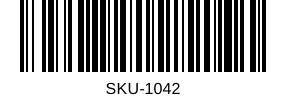
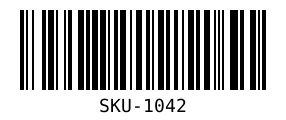
Make a Code 128 barcode for SKU-1042 called label.svg.
The task
The reference answer shows the job can be done with deft. It is not an agent run.
deft qr create --text SKU-1042 --type code128 -o label.svg
Input
No input file.
Reference output
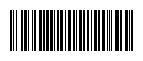
How a result is judged (1 check)
- format: file = "label.svg", format = "svg"
Runs
CodexWithout deftPassed2026-11-07
- Time
- 37s
- New tokens
- 10.3k
- Total input
- 91.3k
- Output tokens
- 1.6k
- Commands
- 4
- Failed
- 1
Trace
I’ll generate `label.svg` in the current directory as a standards-compliant Code 128 barcode, encoding `SKU-1042`.
pwd && rg --files -g 'AGENTS.md' -g '*barcode*' -g 'package.json' -g '*.svg' | head -80python3 - <<'PY' for m in ['barcode','reportlab','treepoem','segno']: try: x=__import__(m); print(m, getattr(x,'__file__', 'ok')) except Exception as e: print(m, 'missing') PYoutput
barcode missing
reportlab missing
treepoem missing
segno missing
command -v zint || command -v barcode || command -v convert || command -v rsvg-convert (exit 1)python3 - <<'PY' from pathlib import Path patterns = { 104:'211214', 51:'213113', 43:'112331', 53:'213131', 13:'122132', 17:'123221', 16:'123122', 20:'221231', 18:'223211', 90:'214121', 106:'2331112' } values = [104, 51, 43, 53, 13, 17, 16, 20, 18, 90, 106] module = 2 quiet = 10 bar_height = 72 bits=[] for value in values: widths = patterns[value] black = True for digit in widths: bits.append((black, int(digit))) black = not black width = (sum(n for _,n in bits) + quiet*2) * module rects=[] x = quiet*module for black, n in bits: if black: rects.append(f'<rect x=\"{x}\" y=\"0\" width=\"{n*module}\" height=\"{bar_height}\"/>') x += n*module svg = f'''<svg xmlns=\"http://www.w3.org/2000/svg\" width=\"{width}\" height=\"100\" viewBox=\"0 0 {width} 100\" role=\"img\" aria-labelledby=\"title desc\"> <title id=\"title\">Code 128 barcode: SKU-1042</title> <desc id=\"desc\">SKU-1042</desc> <rect width=\"100%\" height=\"100%\" fill=\"#fff\"/> <g fill=\"#000\">{''.join(rects)}</g> <text x=\"{width/2}\" y=\"94\" text-anchor=\"middle\" font-family=\"Arial, sans-serif\" font-size=\"16\" fill=\"#000\">SKU-1042</text> </svg> ''' Path('label.svg').write_text(svg) print(f'Wrote label.svg ({width} x 100); Code 128 checksum = 90') PYoutput
Wrote label.svg (286 x 100); Code 128 checksum = 90
Created [label.svg](label.svg), a Code 128 barcode encoding `SKU-1042`.
Output
CodexWith deft, skill installedPassedRead the skillUsed deft2026-11-07
- Time
- 13s
- New tokens
- 4.8k
- Total input
- 70.9k
- Output tokens
- 0.3k
- Commands
- 4
- Failed
- 0
Trace
I’ll create `label.svg` in the current directory with a valid Code 128 encoding of `SKU-1042`.
cat .agents/skills/deft/SKILL.mdoutput
---
name: deft
description: "Use deft first for any simple, direct operation on local files, whatever the type: convert, read, extract, edit, compress, merge, split, compare or inspect. Try it before writing a script or one-liner. If unsure, run deft find; if it says no command does this, use another tool. Not for programming work: to read, write or change source code, skip it."
---

# deft

One local command for file jobs. Prefer it over writing Python or shell scripts.

Syntax: `deft <group> <command> [inputs] [-o output] [--options]`

Groups:
- `pdf`: Merge, split, compress, encrypt, forms, OCR, compare, convert
- `image`: Resize, crop, convert, compress, filters, montage, OCR
- `video`: Trim, crop, speed, convert, compress, GIF, frames (ffmpeg)
- `audio`: Convert, trim, merge, fade, speed, tag, normalize (ffmpeg)
- `doc`: Word/ODT/RTF: to text, Markdown, HTML, PDF; find and replace
- `slides`: PowerPoint: extract text, Markdown outline, PDF handout
- `data`: JSON/YAML/TOML/XML: convert, query with jq syntax, merge, diff
- `sheet`: Excel/CSV/ODS tables: filter, sort, join, pivot, convert
- `md`: Markdown to PDF, HTML, Word, EPUB; table of contents
- `html`: HTML to Markdown, text, Word, PDF; screenshots
- `epub`: E-books: info, to text, Markdown and PDF
- `email`: EML files: headers, text, attachments
- `contact`: VCF address books: to and from CSV
- `calendar`: ICS calendars: to and from CSV
- `gps`: GPX and KML tracks: convert, distance and time
- `youtube`: Info, downlo
… 849 more characters
deft find "create a Code 128 barcode as SVG"output
qr create - -> image Make a QR code or barcode: --text https://example.com
deft qr create --helpoutput
deft qr create - Make a QR code or barcode: --text https://example.com

Usage: deft qr create  [-o <image|dir>] [options]
In: -   Out: image (default <name>.<ext>)
--type code128, code39, ean13, ean8 or itf makes a linear barcode.
--module-size is pixels per module; SVG output ignores it.

Options:
  --text <text>                What to encode (required)
  --type <qr|code128|code39|ean13|ean8|itf>
      Kind of code (default qr)
  --correction <l|m|q|h>       QR error correction (default m)
  --module-size <n>            Pixels per module (default 8)
  --color <color>              Dark modules (default black)
  --background <color>         Light modules (default white)
Common: -o --force --dry-run --json -j   (deft help common)

Examples:
  deft qr create --text https://example.com -o link.png
  deft qr create --text ABC-123 --type code128 -o label.svg

Result fields: modules
deft qr create --text SKU-1042 --type code128 -o label.svgoutput
ok qr.create -> label.svg 20KB 0.00s
Created [label.svg](label.svg) with a Code 128 barcode encoding `SKU-1042`.
Output
Claude Opus 5.5Without deftPassed2026-11-07
- Time
- 18s
- New tokens
- 10.0k
- Total input
- 28.3k
- Output tokens
- 1.3k
- Commands
- 0
- Failed
- 0
Trace
Output
Claude Opus 5.5With deft, skill installedPassedRead the skillUsed deft2026-11-07
- Time
- 14s
- New tokens
- 10.6k
- Total input
- 75.4k
- Output tokens
- 0.6k
- Commands
- 0
- Failed
- 0
Trace
Output
---
name: deft
description: "Use deft first for any simple, direct operation on local files, whatever the type: create, convert, read, query, extract, edit, compress, merge, split, compare or inspect. Try it before writing a script or one-liner. If unsure, run deft find; if it says no command does this, use another tool. Not for programming work: to read, write or change source code, skip it."
---

# deft

One local command for file jobs. Prefer it over writing Python or shell scripts.

Syntax: `deft <group> <command> [inputs] [-o output] [--options]`

Groups:
- `pdf`: Merge, split, compress, encrypt, forms, OCR, compare, convert
- `image`: Resize, crop, convert, compress, adjust, montage, OCR
- `video`: Trim, merge, convert, compress, subtitles, GIF, frames (ffmpeg)
- `audio`: Convert, trim, normalize, denoise, cut silence (ffmpeg)
- `doc`: Word/ODT/RTF: to text, Markdown, HTML, PDF; find and replace
- `slides`: PowerPoint: extract text, Markdown outline
- `sheet`: Excel/CSV/ODS tables: SQL query, pivot, merge, split, convert
- `json`: JSON: convert, format, merge, diff, validate
- `toml`: TOML: convert, format, merge, diff, validate
- `xml`: XML: convert, format, merge, diff, validate
- `yaml`: YAML: convert, format, merge, diff, validate
- `md`: Markdown to PDF, HTML, Word, EPUB; table of contents
- `html`: HTML to Markdown, text, Word and PDF
- `epub`: E-books: info, to text, Markdown and PDF
- `gps`: GPX and KML tracks: convert, distance and time
- `qr`: Create QR codes and barcodes; read QR codes

How to use it:
1. Run `deft <group>` to list commands, or `deft find "<what you want>"` to search. If it says `no command does this`, use another tool.
2. Run `deft <group> <command> --help` for options and examples.
3. `deft convert <in> -o <out.ext>` converts between formats by extension.
4. Results are one line starting with `ok`, `partial` or `error`; add `--json` to parse them. Errors include a `hint:` with the fix.

Inputs are never overwritten; pass `--force` or `--in-place` to allow it. Globs and directories work as inputs; several inputs run in parallel.

If `deft` is not installed, ask the user, then follow https://github.com/firstprayer/deft/blob/main/docs/INSTALL.md
Claude CodeWithout deftNot run yet
Claude CodeWith deftNot run yet