Evals / tables / Format conversion
Table for a report
Turn temperature.xlsx into a Markdown table in table.md.
The task
The reference answer shows the job can be done with deft. It is not an agent run.
deft sheet to-md temperature.xlsx -o table.md
Input
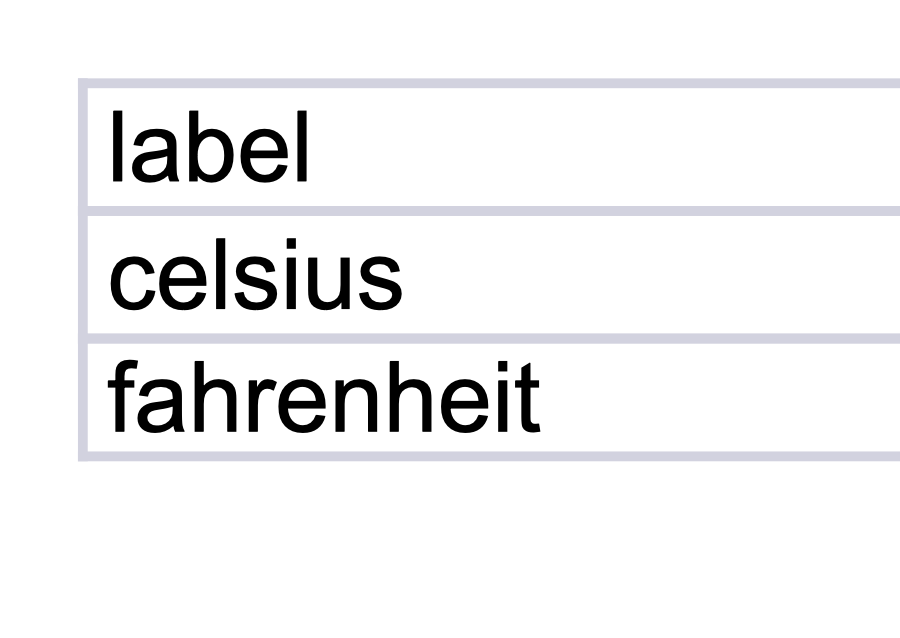
Reference output
| label | value |
| --- | --- |
| celsius | 22.2222 |
| fahrenheit | 72 |
How a result is judged (1 check)
- text: file = "table.md", contains = ["|", "---"]
Runs
CodexWithout deftPassed2026-11-07
- Time
- 20s
- New tokens
- 6.3k
- Total input
- 54.1k
- Output tokens
- 0.5k
- Commands
- 3
- Failed
- 0
Trace
I’ll inspect the workbook sheets and contents, then write the Markdown table to `table.md` in the current directory.
ls -la && python - <<'PY'
import importlib.util
for x in ['openpyxl','pandas']:
 print(x, bool(importlib.util.find_spec(x)))
PY
output
total 8
drwxr-xr-x@    3 user  staff     96 Nov  6 17:27 .
drwx------@ 1750 user  staff  56000 Nov  6 17:27 ..
-rw-r--r--@    1 user  staff   3599 Nov  5 21:11 temperature.xlsx
openpyxl True
pandas True
python - <<'PY'
from openpyxl import load_workbook
p='temperature.xlsx'
w=load_workbook(p, data_only=True, read_only=True)
print(w.sheetnames)
for s in w:
 print('\\nSHEET',s.title,s.max_row,s.max_column)
 for row in s.iter_rows(values_only=True): print(row)
PY
output
['Sheet1']

SHEET Sheet1 None None
('label', 'value')
('celsius', 22.2222)
('fahrenheit', 72.0)
python - <<'PY' from openpyxl import load_workbook from pathlib import Path w=load_workbook('temperature.xlsx', data_only=True, read_only=True) s=w.active rows=list(s.iter_rows(values_only=True)) def cell(v): if v is None: return '' return str(v).replace('|', r'\\|').replace('\\n','<br>') lines=['| '+' | '.join(map(cell, rows[0]))+' |','| '+' | '.join(['---']*len(rows[0]))+' |'] lines += ['| '+' | '.join(map(cell,row))+' |' for row in rows[1:]] Path('table.md').write_text('\\n'.join(lines)+'\\n') PY cat table.mdoutput
| label | value |
| --- | --- |
| celsius | 22.2222 |
| fahrenheit | 72.0 |
Created [table.md](table.md) with the worksheet data as a Markdown table.
Output
| label | value |
| --- | --- |
| celsius | 22.2222 |
| fahrenheit | 72.0 |
CodexWith deft, skill installedPassedRead the skillUsed deft2026-11-07
- Time
- 12s
- New tokens
- 4.6k
- Total input
- 56.7k
- Output tokens
- 0.3k
- Commands
- 3
- Failed
- 0
Trace
I’ll use the `deft` skill for this spreadsheet conversion and write the Markdown table to `table.md` in the current directory.
cat .agents/skills/deft/SKILL.md && pwd && rg --files -g 'temperature.xlsx' -g 'AGENTS.md'output
---
name: deft
description: "Use deft instead of writing a script for file jobs: PDF merge/split/compress/watermark, image resize/convert/compress, video and audio trim/convert/compress, spreadsheets, Markdown to PDF/HTML, and YouTube downloads and subtitles."
---

# deft

One local command for file jobs. Prefer it over writing Python or shell scripts.

Syntax: `deft <group> <command> [inputs] [-o output] [--options]`

Groups:
- `pdf`: Merge, split, compress, encrypt, forms, OCR, compare, convert
- `image`: Resize, crop, convert, compress, filters, montage, OCR
- `video`: Trim, crop, speed, convert, compress, GIF, frames (ffmpeg)
- `audio`: Convert, trim, merge, fade, speed, tag, normalize (ffmpeg)
- `doc`: Word/ODT/RTF: to text, Markdown, HTML, PDF; find and replace
- `slides`: PowerPoint: extract text, Markdown outline, PDF handout
- `data`: JSON/YAML/TOML/XML: convert, query with jq syntax, merge, diff
- `sheet`: Excel/CSV/ODS tables: filter, sort, join, pivot, convert
- `md`: Markdown to PDF, HTML, Word, EPUB; table of contents
- `html`: HTML to Markdown, text, Word, PDF; screenshots
- `epub`: E-books: info, to text, Markdown and PDF
- `email`: EML files: headers, text, attachments
- `contact`: VCF address books: to and from CSV
- `calendar`: ICS calendars: to and from CSV
- `gps`: GPX and KML tracks: convert, distance and time
- `youtube`: Info, download, audio, subtitles, thumbnail (yt-dlp)
- `file`: Any file: hash, duplicates, batch rename, base64, encoding
- `qr`: Cre
… 746 more characters
deft sheet --helpoutput
deft sheet - commands (input -> output)
  info       sheet -> report           Sheet names, rows, columns
  convert    sheet -> sheet            Change format: --to csv|xlsx|json
  dedupe     sheet -> sheet            Drop repeated rows, by whole row or --columns
  extract    sheet -> sheet            Take a sheet or range: --sheet, --range A1:D20
  filter     sheet -> sheet            Keep matching rows: --where "age > 30 and city = 'Oslo'"
  from-pdf   pdf -> sheet              All text as one table [beta]
  group      sheet -> sheet            Group and total: --columns city --values sales --agg sum
  join       sheet... -> sheet         Join two tables on a key: --on id --how left
  merge      sheet... -> sheet         Stack tables; a shared header is kept once
  pivot      sheet -> sheet            Pivot table: --rows city --columns year --values sales
  query      sheet|sqlite... -> sheet  Run SQL over tables or a SQLite file: --sql 'select ...'
  select     sheet -> sheet            Keep, reorder or --drop columns
  sort       sheet -> sheet            Sort rows: --columns age,name --descending
  split      sheet -> sheet...         Split up: --sheets, --columns city or --every 1000
  stats      sheet -> report           Per-column counts, empties, min, max, mean, sum
  to-md      sheet -> md               Markdown table (first row is the header)
  transpose  sheet -> sheet            Swap rows and columns
More: deft sheet <command> --help
deft sheet to-md --help && deft sheet to-md temperature.xlsx -o table.mdoutput
deft sheet to-md - Markdown table (first row is the header)
Same as: deft convert

Usage: deft sheet to-md <sheet>... [-o <md|dir>] [options]
In: sheet (each handled separately)   Out: md (default <name>.<ext>)

Options:
  --sheet <text>               Sheet name or number (default: first)
Common: -o --force --dry-run --json -j   (deft help common)

Examples:
  deft sheet to-md people.csv -o people.md
  deft sheet to-md people.xlsx -o -

Result fields: rows, columns
ok sheet.to-md temperature.xlsx -> table.md  3 rows x 2 columns  0.00s
Converted `temperature.xlsx` into [table.md](table.md). The Markdown table contains 3 rows and 2 columns.
Output
| label | value |
| --- | --- |
| celsius | 22.2222 |
| fahrenheit | 72 |
CodexWith deft, skill as AGENTS.mdPassed2026-11-05
- Time
- 10s
- New tokens
- 5.3k
- Total input
- 60.8k
- Output tokens
- 0.2k
- Commands
- 3
- Failed
- 0
Trace
I’ll inspect the workbook and convert its sheet data into a Markdown table in `table.md` in the current directory.
deft sheet --helpoutput
deft sheet - commands (input -> output)
  info     sheet -> report    Sheet names, rows, columns
  convert  sheet -> sheet     Change format: --to csv|xlsx|json
  extract  sheet -> sheet     Take a sheet or range: --sheet, --range A1:D20
  merge    sheet... -> sheet  Stack tables; a shared header is kept once
  to-md    sheet -> md        Markdown table (first row is the header)
More: deft sheet <command> --help
deft sheet to-md --helpoutput
deft sheet to-md - Markdown table (first row is the header)
Same as: deft convert

Usage: deft sheet to-md <sheet>... [-o <md|dir>] [options]
In: sheet (each handled separately)   Out: md (default <name>.<ext>)

Options:
  --sheet <text>               Sheet name or number (default: first)
Common: -o --force --dry-run --json -j   (deft help common)

Examples:
  deft sheet to-md people.csv -o people.md
  deft sheet to-md people.xlsx -o -

Result fields: rows, columns
deft sheet to-md temperature.xlsx -o table.mdoutput
ok sheet.to-md temperature.xlsx -> table.md 3 rows x 2 columns 0.01s
Converted `temperature.xlsx` into a Markdown table at [table.md](table.md). It contains 3 rows and 2 columns.
Output
Its files were not kept in this run. The last line of the trace is its own report.
Claude Opus 5.5Without deftPassed2026-11-07
- Time
- 26s
- New tokens
- 10.0k
- Total input
- 71.9k
- Output tokens
- 1.0k
- Commands
- 0
- Failed
- 0
Trace
Output
| label | value |
| --- | ---: |
| celsius | 22.2222 |
| fahrenheit | 72 |
Claude Opus 5.5With deft, skill installedPassedRead the skillUsed deft2026-11-07
- Time
- 15s
- New tokens
- 9.3k
- Total input
- 43.6k
- Output tokens
- 0.3k
- Commands
- 0
- Failed
- 0
Trace
Output
---
name: deft
description: "Use deft first for any simple, direct operation on local files, whatever the type: convert, read, extract, edit, compress, merge, split, compare or inspect. Try it before writing a script or one-liner. If unsure, run deft find; if it says no command does this, use another tool. Not for programming work: to read, write or change source code, skip it."
---

# deft

One local command for file jobs. Prefer it over writing Python or shell scripts.

Syntax: `deft <group> <command> [inputs] [-o output] [--options]`

Groups:
- `pdf`: Merge, split, compress, encrypt, forms, OCR, compare, convert
- `image`: Resize, crop, convert, compress, adjust, montage, OCR
- `video`: Trim, merge, convert, compress, subtitles, GIF, frames (ffmpeg)
- `audio`: Convert, trim, normalize, denoise, cut silence (ffmpeg)
- `doc`: Word/ODT/RTF: to text, Markdown, HTML, PDF; find and replace
- `slides`: PowerPoint: extract text, Markdown outline
- `sheet`: Excel/CSV/ODS tables: SQL query, pivot, merge, split, convert
- `json`: JSON: convert, format, merge, diff, validate
- `toml`: TOML: convert, format, merge, diff, validate
- `xml`: XML: convert, format, merge, diff, validate
- `yaml`: YAML: convert, format, merge, diff, validate
- `md`: Markdown to PDF, HTML, Word, EPUB; table of contents
- `html`: HTML to Markdown, text, Word and PDF
- `epub`: E-books: info, to text, Markdown and PDF
- `gps`: GPX and KML tracks: convert, distance and time
- `qr`: Create QR codes and barcodes; read QR codes

How to use it:
1. Run `deft <group>` to list commands, or `deft find "<what you want>"` to search. If it says `no command does this`, use another tool.
2. Run `deft <group> <command> --help` for options and examples.
3. `deft convert <in> -o <out.ext>` converts between formats by extension.
4. Results are one line starting with `ok`, `partial` or `error`; add `--json` to parse them. Errors include a `hint:` with the fix.

Inputs are never overwritten; pass `--force` or `--in-place` to allow it. Globs and directories work as inputs; several inputs run in parallel.

If `deft` is not installed, ask the user, then follow https://github.com/firstprayer/deft/blob/main/docs/INSTALL.md
| label | value |
| --- | --- |
| celsius | 22.2222 |
| fahrenheit | 72 |
Claude CodeWithout deftNot run yet
Claude CodeWith deftNot run yet