Evals / video / Stills, GIFs and slideshows
Photos to a video
Make a slideshow show.mp4 from hopper.png and DSCN0010.jpg, three seconds each.
The task
The reference answer shows the job can be done with deft. It is not an agent run.
deft video from-images hopper.png DSCN0010.jpg --duration 3 -o show.mp4
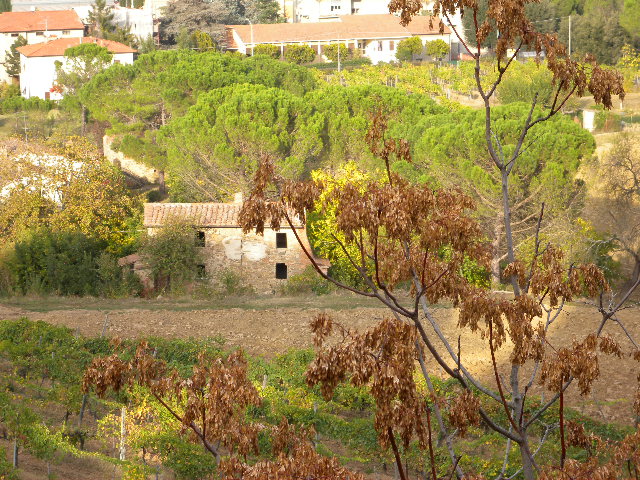
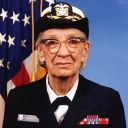
Reference output
How a result is judged (1 check)
- media: file = "show.mp4", duration = 6, tolerance = 0.5
Runs
CodexWithout deftPassed2026-11-07
- Time
- 12s
- New tokens
- 8.0k
- Total input
- 42.6k
- Output tokens
- 0.4k
- Commands
- 2
- Failed
- 0
Trace
I’ll check the two image files and available video tools, then create `show.mp4` in the current directory with each image shown for three seconds.
pwd && rg --files -g 'hopper.png' -g 'DSCN0010.jpg' -g 'AGENTS.md' -g 'show.mp4' && command -v ffmpeg || trueoutput
DSCN0010.jpg
hopper.png
/opt/homebrew/bin/ffmpeg
ffmpeg -y -loop 1 -t 3 -i hopper.png -loop 1 -t 3 -i DSCN0010.jpg -filter_complex "[0:v]scale=1280:720:force_original_aspect_ratio=decrease,pad=1280:720:(ow-iw)/2:(oh-ih)/2,setsar=1,format=yuv420p[v0];[1:v]scale=1280:720:force_original_aspect_ratio=decrease,pad=1280:720:(ow-iw)/2:(oh-ih)/2,setsar=1,format=yuv420p[v1];[v0][v1]concat=n=2:v=1:a=0[out]" -map "[out]" -r 30 -t 6 -movflags +faststart show.mp4output
ffmpeg version 7.1.1 Copyright (c) 2000-2025 the FFmpeg developers
  built with Apple clang version 15.0.0 (clang-1500.1.0.2.5)
  configuration: --prefix=/opt/homebrew/Cellar/ffmpeg/7.1.1_1 --enable-shared --enable-pthreads --enable-version3 --cc=clang --host-cflags= --host-ldflags='-Wl,-ld_classic' --enable-ffplay --enable-gnutls --enable-gpl --enable-libaom --enable-libaribb24 --enable-libbluray --enable-libdav1d --enable-libharfbuzz --enable-libjxl --enable-libmp3lame --enable-libopus --enable-librav1e --enable-librist --enable-librubberband --enable-libsnappy --enable-libsrt --enable-libssh --enable-libsvtav1 --enable-libtesseract --enable-libtheora --enable-libvidstab --enable-libvmaf --enable-libvorbis --enable-libvpx --enable-libwebp --enable-libx264 --enable-libx265 --enable-libxml2 --enable-libxvid --enable-lzma --enable-libfontconfig --enable-libfreetype --enable-frei0r --enable-libass --enable-libopencore-amrnb --enable-libopencore-amrwb --enable-libopenjpeg --enable-libspeex --enable-libsoxr --enable-libzmq --enable-libzimg --disable-libjack --disable-indev=jack --enable-videotoolbox --enable-audiotoolbox --enable-neon
  libavutil      59. 39.100 / 59. 39.100
  libavcodec     61. 19.101 / 61. 19.101
  libavformat    61.  7.100 / 61.  7.100
  libavdevice    61.  3.100 / 61.  3.100
  libavfilter    10.  4.100 / 10.  4.100
  libswscale      8.  3.100 /  8.  3.100
  libswresample   5.  3.100 /  5.  3.100
  libpostproc    58.  3.100 / 58.  3.100
Input #0, png_pipe, fro
… 3394 more characters
Created [show.mp4](show.mp4). It shows `hopper.png` followed by `DSCN0010.jpg`, three seconds each.
Output
CodexWith deft, skill installedPassedRead the skillUsed deft2026-11-07
- Time
- 17s
- New tokens
- 5.7k
- Total input
- 73.0k
- Output tokens
- 0.5k
- Commands
- 4
- Failed
- 0
Trace
I’ll check the media files and the `deft` instructions, then create `show.mp4` in the current directory with each image displayed for three seconds.
cat .agents/skills/deft/SKILL.md && rg --files -g 'hopper.png' -g 'DSCN0010.jpg' -g 'AGENTS.md'output
---
name: deft
description: "Use deft instead of writing a script for file jobs: PDF merge/split/compress/watermark, image resize/convert/compress, video and audio trim/convert/compress, spreadsheets, Markdown to PDF/HTML, and YouTube downloads and subtitles."
---

# deft

One local command for file jobs. Prefer it over writing Python or shell scripts.

Syntax: `deft <group> <command> [inputs] [-o output] [--options]`

Groups:
- `pdf`: Merge, split, compress, encrypt, forms, OCR, compare, convert
- `image`: Resize, crop, convert, compress, filters, montage, OCR
- `video`: Trim, crop, speed, convert, compress, GIF, frames (ffmpeg)
- `audio`: Convert, trim, merge, fade, speed, tag, normalize (ffmpeg)
- `doc`: Word/ODT/RTF: to text, Markdown, HTML, PDF; find and replace
- `slides`: PowerPoint: extract text, Markdown outline, PDF handout
- `data`: JSON/YAML/TOML/XML: convert, query with jq syntax, merge, diff
- `sheet`: Excel/CSV/ODS tables: filter, sort, join, pivot, convert
- `md`: Markdown to PDF, HTML, Word, EPUB; table of contents
- `html`: HTML to Markdown, text, Word, PDF; screenshots
- `epub`: E-books: info, to text, Markdown and PDF
- `email`: EML files: headers, text, attachments
- `contact`: VCF address books: to and from CSV
- `calendar`: ICS calendars: to and from CSV
- `gps`: GPX and KML tracks: convert, distance and time
- `youtube`: Info, download, audio, subtitles, thumbnail (yt-dlp)
- `file`: Any file: hash, duplicates, batch rename, base64, encoding
- `qr`: Cre
… 752 more characters
Both images are present. I’m checking `deft`’s video options for a slideshow command and duration settings.
deft videooutput
deft video - commands (input -> output)
  info               video -> report      Duration, size, frame rate, codecs
  add-audio          video -> video       Replace or mix the soundtrack: --audio song.mp3
  add-subtitles      video -> video       Add subtitles: burned into the picture, or --soft
  chunk              video -> video...    Cut into equal parts: --length 10:00
  compress           video -> mp4         Smaller file: --level, --target-size, --max-height
  convert            video|gif -> video   Change container and codec: --to mp4|webm|mov|mkv
  crop               video -> video       Cut a region: --box or --aspect 1:1
  download           url -> video         Save a video: --resolution 720p, --to mp4|webm|mkv [net]
  extract-audio      video -> audio       Save the soundtrack: --to mp3|m4a|wav|flac|ogg
  extract-subtitles  video -> srt|vtt     Save an embedded subtitle track: --to srt|vtt
  fade               video -> video       Fade: --fade-in 1 --fade-out 2
  frames             video -> png|jpg...  Save frames as images: --fps 1 or --at 0:05,0:10
  from-images        image... -> video    Slideshow: --duration, --fps, --audio
  merge              video... -> mp4      Join videos; --transition fades
  mute               video -> video       Remove the audio track
  pad                video -> video       Fit into a frame with bars: --size 1080x1920
  repeat             video -> video       Repeat a video: --count 3 plays it three times
  resize             vid
… 891 more characters
deft video from-images --helpoutput
deft video from-images - Slideshow: --duration, --fps, --audio
Same as: deft image to-video

Usage: deft video from-images <image>... [-o <video|dir>] [options]
In: image (all together, in order)   Out: video (default <name>.video.<ext>)
Images are fitted to the size of the first; order is as given.

Options:
  --duration <time>            Seconds per image
  --fps <number>               Images per second
  --audio <path>               Soundtrack; the video stops at its end
  --size <size>                Frame size, e.g. 1280x720
Common: -o --force --dry-run --json -j   (deft help common)

Examples:
  deft video from-images photo-1.jpg photo-2.jpg --duration 2 -o show.mp4
  deft video from-images photo-1.jpg --duration 3 --audio tone.mp3 -o still.mp4
Needs: ffmpeg, ffprobe
deft video from-images hopper.png DSCN0010.jpg --duration 3 -o show.mp4output
ok video.from-images hopper.png DSCN0010.jpg -> show.mp4 15KB 0.26s
Created [show.mp4](show.mp4) from `hopper.png` followed by `DSCN0010.jpg`, with each image shown for three seconds.
Output
Claude Opus 5.5Without deftPassed2026-11-07
- Time
- 12s
- New tokens
- 9.5k
- Total input
- 42.6k
- Output tokens
- 0.8k
- Commands
- 0
- Failed
- 0
Trace
Output
Claude Opus 5.5With deft, skill installedPassedRead the skillUsed deft2026-11-07
- Time
- 12s
- New tokens
- 10.3k
- Total input
- 60.0k
- Output tokens
- 0.6k
- Commands
- 0
- Failed
- 0
Trace
Output
---
name: deft
description: "Use deft first for any simple, direct operation on local files, whatever the type: convert, read, extract, edit, compress, merge, split, compare or inspect. Try it before writing a script or one-liner. If unsure, run deft find; if it says no command does this, use another tool. Not for programming work: to read, write or change source code, skip it."
---

# deft

One local command for file jobs. Prefer it over writing Python or shell scripts.

Syntax: `deft <group> <command> [inputs] [-o output] [--options]`

Groups:
- `pdf`: Merge, split, compress, encrypt, forms, OCR, compare, convert
- `image`: Resize, crop, convert, compress, adjust, montage, OCR
- `video`: Trim, merge, convert, compress, subtitles, GIF, frames (ffmpeg)
- `audio`: Convert, trim, normalize, denoise, cut silence (ffmpeg)
- `doc`: Word/ODT/RTF: to text, Markdown, HTML, PDF; find and replace
- `slides`: PowerPoint: extract text, Markdown outline
- `sheet`: Excel/CSV/ODS tables: SQL query, pivot, merge, split, convert
- `json`: JSON: convert, format, merge, diff, validate
- `toml`: TOML: convert, format, merge, diff, validate
- `xml`: XML: convert, format, merge, diff, validate
- `yaml`: YAML: convert, format, merge, diff, validate
- `md`: Markdown to PDF, HTML, Word, EPUB; table of contents
- `html`: HTML to Markdown, text, Word and PDF
- `epub`: E-books: info, to text, Markdown and PDF
- `gps`: GPX and KML tracks: convert, distance and time
- `qr`: Create QR codes and barcodes; read QR codes

How to use it:
1. Run `deft <group>` to list commands, or `deft find "<what you want>"` to search. If it says `no command does this`, use another tool.
2. Run `deft <group> <command> --help` for options and examples.
3. `deft convert <in> -o <out.ext>` converts between formats by extension.
4. Results are one line starting with `ok`, `partial` or `error`; add `--json` to parse them. Errors include a `hint:` with the fix.

Inputs are never overwritten; pass `--force` or `--in-place` to allow it. Globs and directories work as inputs; several inputs run in parallel.

If `deft` is not installed, ask the user, then follow https://github.com/firstprayer/deft/blob/main/docs/INSTALL.md
Claude CodeWithout deftNot run yet
Claude CodeWith deftNot run yet