Markdown to WordPassed
Convert report.md to a Word document called report.docx.
deft md to-docx report.md -o report.docx
Input
doc/images/CSpeed2.png 71.6 KB · 1325x741
doc/images/DCspeed5.png 67.7 KB · 1670x705
doc/images/DSpeed3.png 26.5 KB · 606x733
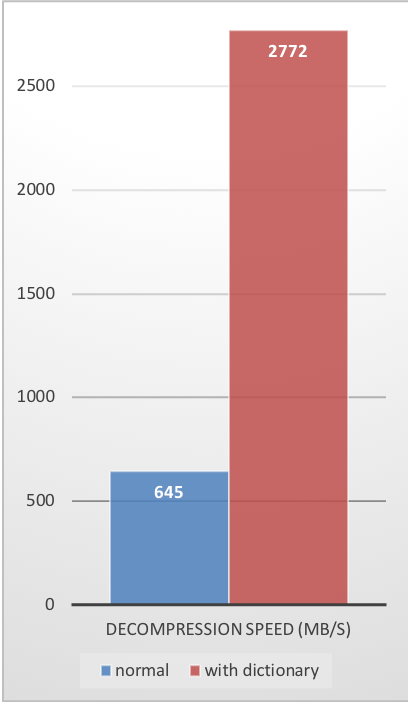
doc/images/dict-cr.png 88.3 KB · 408x700
doc/images/dict-cs.png 89.4 KB · 408x700
doc/images/dict-ds.png 96.0 KB · 408x702
report.md 11.6 KB
<p align="center"><img src="https://raw.githubusercontent.com/facebook/zstd/dev/doc/images/zstd_logo86.png" alt="Zstandard"></p>

__Zstandard__, or `zstd` as short version, is a fast lossless compression algorithm,
targeting real-time compression scenarios at zlib-level and better compression ratios.
It's backed by a very fast entropy stage, provided by [Huff0 and FSE library](https://github.com/Cyan4973/FiniteStateEntropy).

Zstandard's format is stable and documented in [RFC8878](https://datatracker.ietf.org/doc/html/rfc8878). Multiple independent implementations are already available.
This repository represents the reference implementation, provided as an open-source dual [BSD](LICENSE) OR [GPLv2](COPYING) licensed **C** library,
and a command line utility producing and decoding `.zst`, `.gz`, `.xz` and `.lz4` files.
Should your project require another programming language,
a list of known ports and bindings is provided on [Zstandard homepage](https://facebook.github.io/zstd/#other-languages).

**Development branch status:**

[![Build Status][travisDevBadge]][travisLink]
[![Build status][CircleDevBadge]][CircleLink]
[![Build status][CirrusDevBadge]][CirrusLink]
[![Fuzzing Status][OSSFuzzBadge]][OSSFuzzLink]

[travisDevBadge]: https://api.travis-ci.com/facebook/zstd.svg?branch=dev "Continuous Integration test suite"
[travisLink]: https://travis-ci.com/facebook/zstd
[CircleDevBadge]: https://circleci.com/gh/facebook/zstd/tree/dev.svg?style=shield "Short test suite"
[CircleLink]: https://circleci.com/gh/facebook/zstd
[CirrusDevBadge]: https://api.cirrus-ci.com/github/facebook/zstd.svg?branch=dev
[CirrusLink]: https://cirrus-ci.com/github/facebook/zstd
[OSSFuzzBadge]: https://oss-fuzz-build-logs.storage.googleapis.com/badges/zstd.svg
[OSSFuzzLink]: https://bugs.chromium.org/p/oss-fuzz/issues/list?sort=-opened&can=1&q=proj:zstd

## Benchmarks

For reference, several fast compression algorithms were tested and compared
on a desktop featuring a Core i7-9700K CPU @ 4.9GHz
and running Ubuntu 24.04 (`Linux 6.8.0-53-generic`),
using [lzbench], an open-source in-memory benchmark by @inikep
compiled with [gcc] 14.2.0,
on the [Silesia compression corpus].

[lzbench]: https://github.com/inikep/lzbench
[Silesia compression corpus]: https://sun.aei.polsl.pl//~sdeor/index.php?page=silesia
[gcc]: https://gcc.gnu.org/

| Compressor name         | Ratio | Compression| Decompress.|
| ---------------         | ------| -----------| ---------- |
| **zstd 1.5.7 -1**       | 2.896 |   510 MB/s |  1550 MB/s |
| brotli 1.1.0 -1         | 2.883 |   290 MB/s |   425 MB/s |
| [zlib] 1.3.1 -1         | 2.743 |   105 MB/s |   390 MB/s |
| **zstd 1.5.7 --fast=1** | 2.439 |   545 MB/s |  1850 MB/s |
| quicklz 1.5.0 -1        | 2.238 |   520 MB/s |   750 MB/s |
| **zstd 1.5.7 --fast=4** | 2.146 |   665 MB/s |  2050 MB/s |
| lzo1x 2.10 -1           | 2.106 |   650 MB/s |   780 MB/s |
| [lz4] 1.10.0            | 2.101 |   675 MB/s |  3850 MB/s |
| snappy 1.2.1            | 2.089 |
… 8836 more characters
Output
report.docx 372.0 KB
Rendered by macOS Quick Look, first page
Text inside
Zstandard, or zstd as short version, is a fast lossless compression algorithm, targeting real-time compression scenarios at zlib-level and better compression ratios. It's backed by a very fast entropy stage, provided by Huff0 and FSE library.
Zstandard's format is stable and documented in RFC8878. Multiple independent implementations are already available. This repository represents the reference implementation, provided as an open-source dual BSD OR GPLv2 licensed C library, and a command line utility producing and decoding .zst, .gz, .xz and .lz4 files. Should your project require another programming language, a list of known ports and bindings is provided on Zstandard homepage.
Development branch status:
 Build status Build status
Benchmarks
For reference, several fast compression algorithms were tested and compared on a desktop featuring a Core i7-9700K CPU @ 4.9GHz and running Ubuntu 24.04 (Linux 6.8.0-53-generic), using lzbench, an open-source in-memory benchmark by @inikep compiled with gcc 14.2.0, on the Silesia compression corpus.
Compressor name
Ratio
Compression
Decompress.
zstd 1.5.7 -1
2.896
510 MB/s
1550 MB/s
brotli 1.1.0 -1
2.883
290 MB/s
425 MB/s
zlib 1.3.1 -1
2.743
105 MB/s
390 MB/s
zstd 1.5.7 --fast=1
2.439
545 MB/s
1850 MB/s
quicklz 1.5.0 -1
2.238
520 MB/s
750 MB/s
zstd 1.5.7 --fast=4
2.146
665 MB/s
2050 MB/s
lzo1x 2.10 -1
2.106
650 MB/s
780 MB/s
lz4 1.10.0
2.101
675 MB/s
3850 MB/s
snappy 1.2.1
2.089
520 MB/s
1500 MB/s
lzf 3.6 -1
2.077
410 MB/s
820 MB/s

The negative compression levels, specified with --fast=#, offer faster compression and decompression speed at the cost of compression ratio.
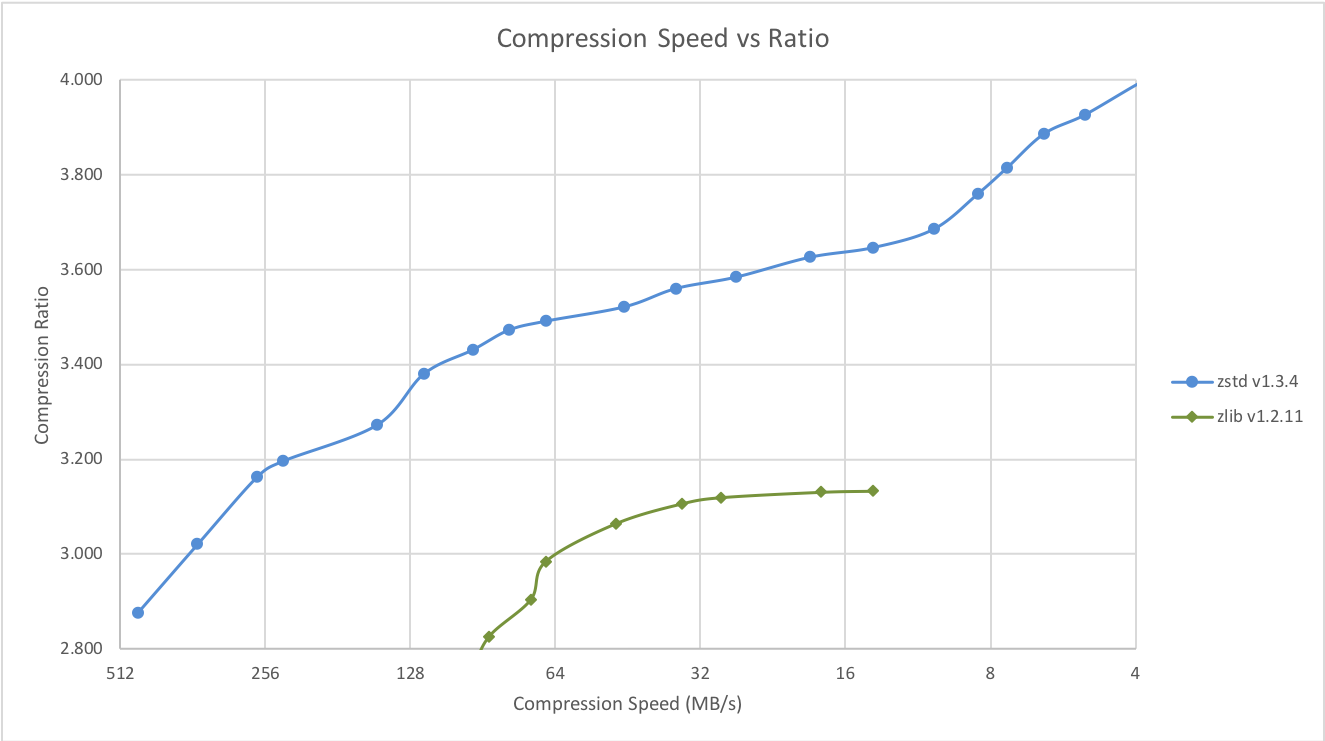
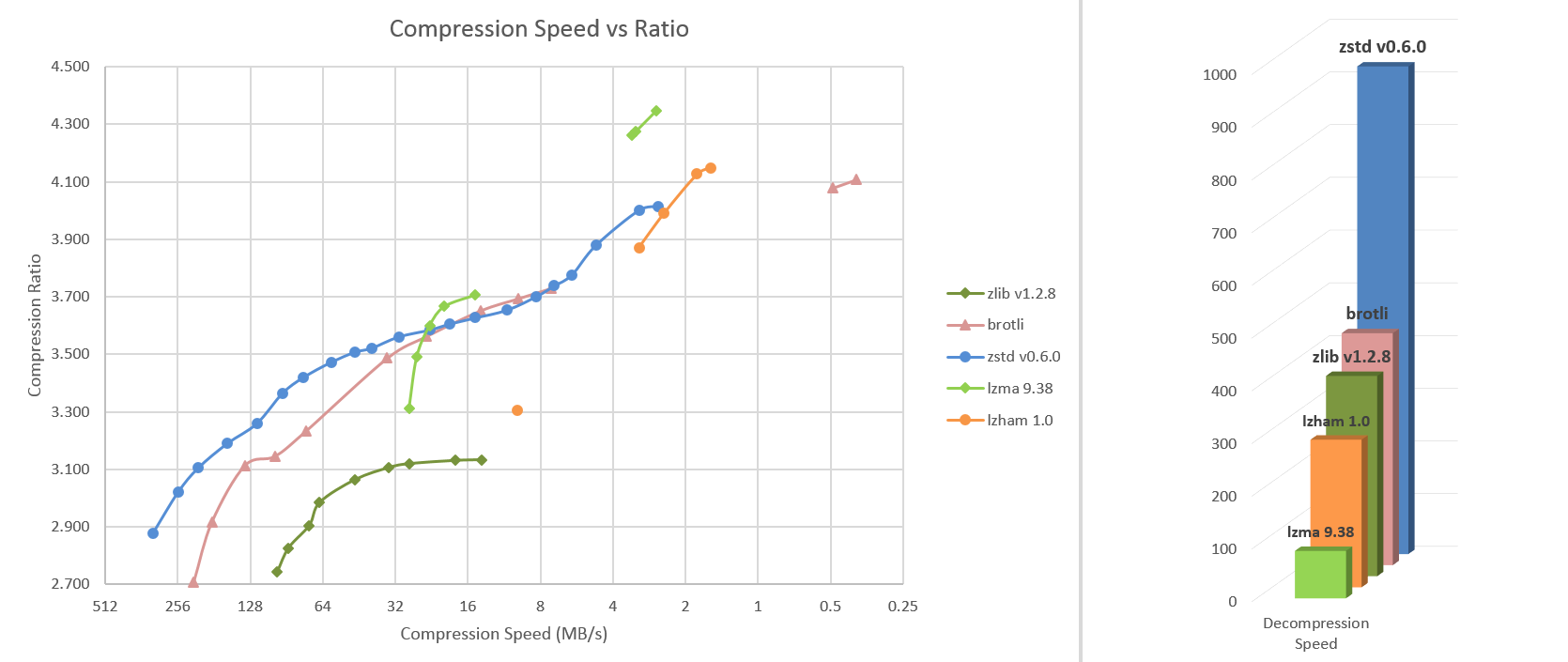
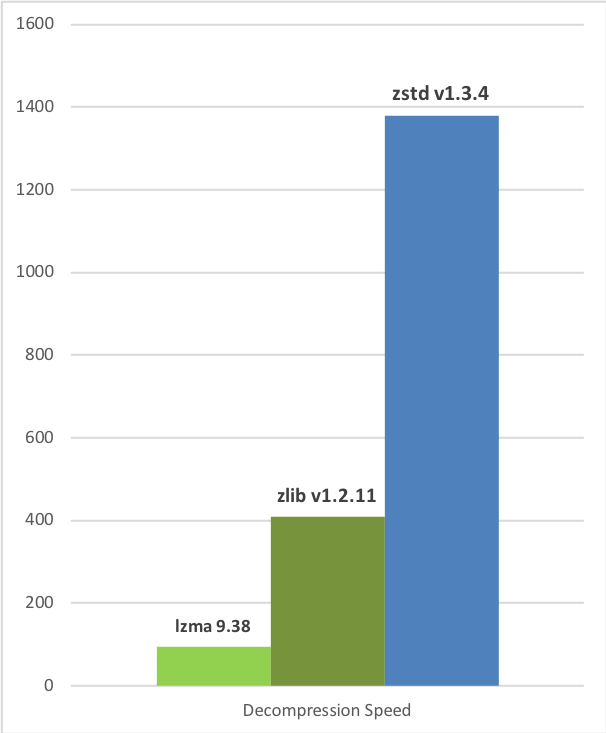
Zstd can also offer stronger compression ratios at the cost of compression speed. Speed vs Compression trade-off is configurable by small increments. Decompression speed is preserved and remains roughly the same at all settings, a property shared by most LZ compression algorithms, such as zlib or lzma.
The following tests were run on a server running Linux Debian (Linux version 4.14.0-3-amd64) with a Core i7-6700K CPU @ 4.0GHz, using lzbench, an open-source in-memory benchmark by @inikep compiled with gcc 7.3.0, on the Silesia compression corpus.
Compression Speed vs Ratio
Decompression Speed


A few other algorithms can produce higher compression ratios at slower speeds, falling outside of the graph. For a larger picture including slow modes, click on this link.
The case for Small Data compression
Previous charts provide results applicable to typical file and stream scenarios (several MB). Small data comes with different perspectives.
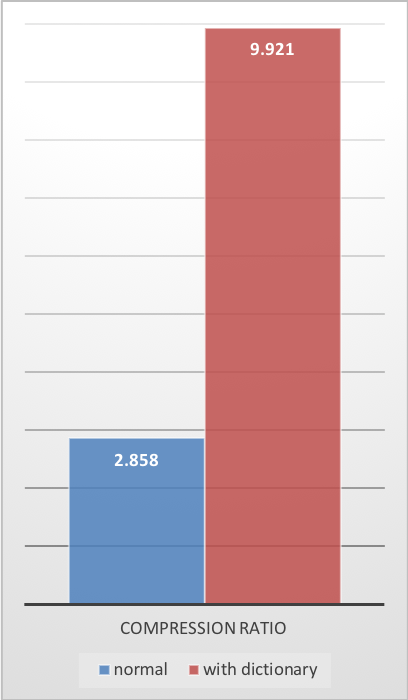
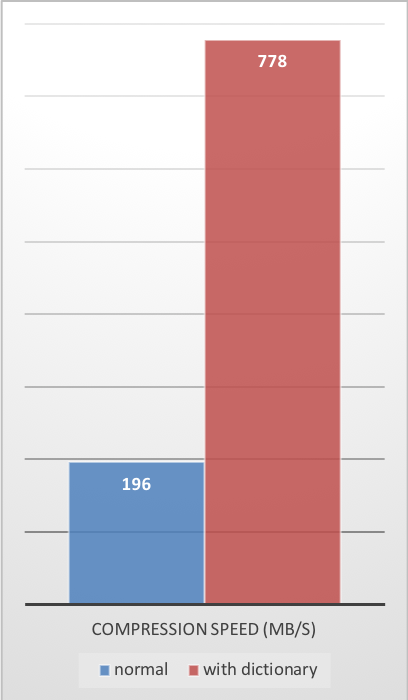
The smaller the amount of data to compress, the more difficult it is to compress. This problem is common to all compression algorithms, and reason is, compression algorithms learn from past data how to compress future data. But at the beginning of a new data set, there is no "past" to build upon.
To solve this situation, Zstd offers a training mode, which can be used to tune the algorithm for a selected t
… 5762 more characters
Automatic checks (2)
- format: file = "report.docx", format = "docx"
- python: code = "import zipfile; z = zipfile.ZipFile('report.docx'); m = [n for n in z.namelist() if n.startswith('word/media/')]; assert len(m) >= 5, m; x = z.read('word/document.xml'); assert b'Heading' in x and b'<w:tbl>' in x"