Evals / documents / Make a PDF
Web page to PDF
Convert article.html to article.pdf.
The task
The reference answer shows the job can be done with deft. It is not an agent run.
deft html to-pdf article.html -o article.pdf
Input
<!doctype html>
<html lang="en">
<head><title>Tea exports in 2025</title><style>body{font-family:serif}</style><script>track()</script></head>
<body>
<header><a href="/">Daily Leaf</a></header>
<nav><ul><li><a href="/news">News</a></li><li><a href="/about">About us</a></li></ul></nav>
<main>
<article>
<h1>Tea exports in 2025</h1>
<p>Exports rose for the third year in a row, led by <strong>Kenya</strong> and Sri Lanka. Growers credit a mild season and steady demand from the Gulf states, while shipping costs fell back after two difficult years.</p>
<h2>By country</h2>
<table><thead><tr><th>Country</th><th>Tonnes</th></tr></thead><tbody><tr><td>Kenya</td><td>590000</td></tr><tr><td>Sri Lanka</td><td>245000</td></tr></tbody></table>
<ul><li>Prices were stable</li><li>Green tea grew fastest</li></ul>
</article>
</main>
<aside>Subscribe to our newsletter</aside>
<footer>Copyright Daily Leaf</footer>
<script>analytics()</script>
</body>
</html>
Reference output
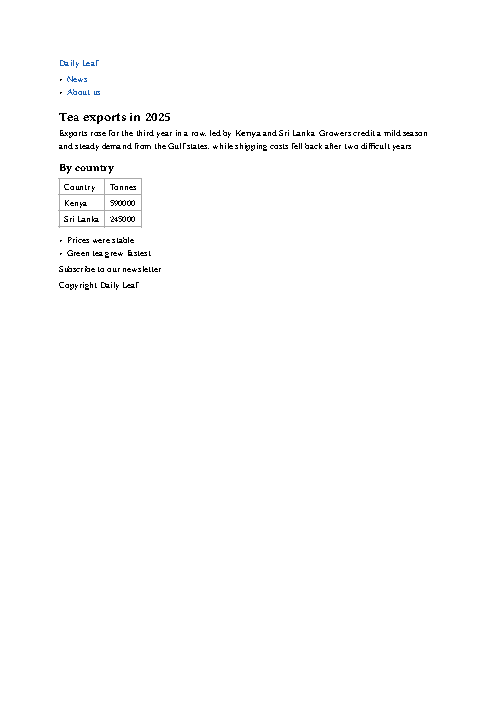
How a result is judged (1 check)
- pdf_text: file = "article.pdf", contains = ["Exports rose"]
Runs
CodexWithout deftPassed2026-11-07
- Time
- 120s
- New tokens
- 17.5k
- Total input
- 176.6k
- Output tokens
- 2.6k
- Commands
- 9
- Failed
- 5
Trace
I’ll inspect the HTML and available PDF conversion tools, then create `article.pdf` in the current directory.
pwd && rg --files -g 'article.html' -g 'AGENTS.md' -g '"'!node_modules'"' && command -v weasyprint; command -v chromium; command -v google-chrome; command -v wkhtmltopdf; command -v pandoc (exit 1)output
article.html
python3 - <<'PY'
mods=['weasyprint','reportlab','playwright','selenium','pdfkit']
for x in mods:
 try:
  m=__import__(x); print(x, getattr(m,'__version__','available'))
 except Exception: pass
PY
rg --files -g 'AGENTS.md' -g '*.pdf' -g '"'!node_modules'"' (exit 1)
ls -la && command -v cupsfilter; command -v textutil; command -v osascript; command -v firefox; command -v qutebrowser; command -v xhtml2pdf (exit 1)output
total 8
drwxr-xr-x@    3 user  staff     96 Nov  7 00:46 .
drwx------@ 2102 user  staff  67264 Nov  7 00:47 ..
-rw-r--r--@    1 user  staff    952 Nov  5 18:26 article.html
/usr/sbin/cupsfilter
/usr/bin/textutil
/usr/bin/osascript
cupsfilter --list-filters article.html (exit 1)output
cupsfilter: No filter to convert from text/html to application/pdf.
cat article.htmloutput
<!doctype html>
<html lang="en">
<head><title>Tea exports in 2025</title><style>body{font-family:serif}</style><script>track()</script></head>
<body>
<header><a href="/">Daily Leaf</a></header>
<nav><ul><li><a href="/news">News</a></li><li><a href="/about">About us</a></li></ul></nav>
<main>
<article>
<h1>Tea exports in 2025</h1>
<p>Exports rose for the third year in a row, led by <strong>Kenya</strong> and Sri Lanka. Growers credit a mild season and steady demand from the Gulf states, while shipping costs fell back after two difficult years.</p>
<h2>By country</h2>
<table><thead><tr><th>Country</th><th>Tonnes</th></tr></thead><tbody><tr><td>Kenya</td><td>590000</td></tr><tr><td>Sri Lanka</td><td>245000</td></tr></tbody></table>
<ul><li>Prices were stable</li><li>Green tea grew fastest</li></ul>
</article>
</main>
<aside>Subscribe to our newsletter</aside>
<footer>Copyright Daily Leaf</footer>
<script>analytics()</script>
</body>
</html>
textutil -convert docx article.html -output <tmp> && cupsfilter -i application/vnd.openxmlformats-officedocument.wordprocessingml.document -m application/pdf <tmp> > article.pdf && file article.pdf (exit 1)output
Error reading article.html.  Couldn’t communicate with a helper application.
cupsfilter: Unknown source MIME type application/vnd.openxmlformats-officedocument.wordprocessingml.document.
swift --versionoutput
swift-driver version: 1.127.14.1 Apple Swift version 6.2.3 (swiftlang-6.2.3.3.21 clang-1700.6.3.2)
Target: arm64-apple-macosx26.0
ls -l article.pdf 2>/dev/null || true; pgrep -fl 'htmlpdf|swift' | headoutput
-rw-r--r--@ 1 user  staff  0 Nov  7 00:47 article.pdf
sysmon request failed with error: sysmond service not found
pgrep: Cannot get process list
cat > <tmp> <<'PY'
from html.parser import HTMLParser
from pathlib import Path
import textwrap

class Extract(HTMLParser):
    def __init__(self):
        super().__init__(); self.parts=[]; self.in_title=False
    def handle_starttag(self, tag, attrs):
        if tag in ('h1','h2','p','li','tr','header','aside','footer'): self.parts.append(('\\n', tag))
        if tag in ('th','td'): self.parts.append((' | ', 'sep'))
    def handle_endtag(self, tag):
        if tag in ('h1','h2','p','li','tr','header','aside','footer'): self.parts.append(('\\n', 'break'))
    def handle_data(self, data):
        s=' '.join(data.split())
        if s: self.parts.append((s, 'text'))
p=Extract(); p.feed(Path('article.html').read_text())
lines=[]; current=''
for txt, kind in p.parts:
    if kind=='break':
        if current.strip(): lines.extend(textwrap.wrap(current.strip(), 88))
        lines.append(''); current=''
    elif kind=='sep': current += txt
    elif kind=='text': current += ('' if not current or current.endswith(' ') else ' ') + txt
if current.strip(): lines.extend(textwrap.wrap(current.strip(),88))
lines=[x for x in lines if x.strip()]
# PDF with readable hierarchy in a standard letter page.
ops=['BT','/F1 11 Tf','54 738 Td','14 TL']
for line in lines:
    esc=line.replace('\\\\','\\\\\\\\').replace('(','\\\\(').replace(')','\\\\)')
    ops.append(f'({esc}) Tj T*')
ops.append('ET'); stream='\\n'.join(ops).encode('latin-1','replace')
objs=[b'<< /Type /Catalog /Pages 2 0 R >>',b'<< /Type /Pages /Kids [3 0 R] /Count 1 >>',b'<< /Type /Page /Parent 2 0 R /MediaBox [0 0 612 792] /Resources << /Font << /F1 4 0 R >> >> /Contents 5 0 R >>',b'<< /Type /Font /Subtype /Type1 /BaseFont /Times-Roman >>',b'<< /Length '+str(len(stream)).encode()+b' >>\\nstream\\n'+stream+b'\\nendstream']
out=
… 535 more characters
output
article.pdf: PDF document, version 1.4, 1 pages
-rw-r--r--@ 1 user  staff   1.2K Nov  7 00:48 article.pdf
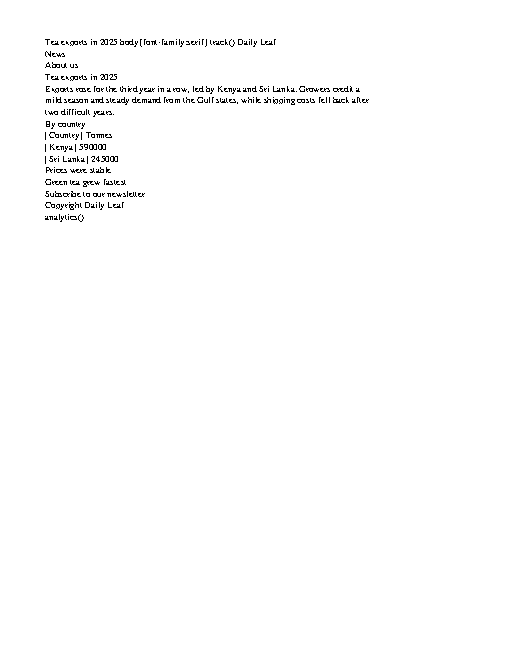
Created [article.pdf](article.pdf) in the current directory. It contains the article text in a one-page PDF.
Output
CodexWith deft, skill installedPassedRead the skillUsed deft2026-11-07
- Time
- 13s
- New tokens
- 4.5k
- Total input
- 56.3k
- Output tokens
- 0.4k
- Commands
- 3
- Failed
- 0
Trace
I’ll convert `article.html` in the current directory to `article.pdf` and check that the PDF was created.
cat .agents/skills/deft/SKILL.md && pwd && rg --files -g 'article.html' -g 'article.pdf' -g 'AGENTS.md'output
---
name: deft
description: "Use deft first for any simple, direct operation on local files, whatever the type: convert, read, extract, edit, compress, merge, split, compare or inspect. Try it before writing a script or one-liner. If unsure, run deft find; if it says no command does this, use another tool. Not for programming work: to read, write or change source code, skip it."
---

# deft

One local command for file jobs. Prefer it over writing Python or shell scripts.

Syntax: `deft <group> <command> [inputs] [-o output] [--options]`

Groups:
- `pdf`: Merge, split, compress, encrypt, forms, OCR, compare, convert
- `image`: Resize, crop, convert, compress, adjust, montage, OCR
- `video`: Trim, merge, convert, compress, subtitles, GIF, frames (ffmpeg)
- `audio`: Convert, trim, normalize, denoise, cut silence (ffmpeg)
- `doc`: Word/ODT/RTF: to text, Markdown, HTML, PDF; find and replace
- `slides`: PowerPoint: extract text, Markdown outline
- `sheet`: Excel/CSV/ODS tables: SQL query, pivot, merge, split, convert
- `json`: JSON: convert, format, merge, diff, validate
- `toml`: TOML: convert, format, merge, diff, validate
- `xml`: XML: convert, format, merge, diff, validate
- `yaml`: YAML: convert, format, merge, diff, validate
- `md`: Markdown to PDF, HTML, Word, EPUB; table of contents
- `html`: HTML to Markdown, text, Word and PDF
- `epub`: E-books: info, to text, Markdown and PDF
- `gps`: GPX and KML tracks: convert, distance and time
- `qr`: Create QR codes and barcodes; r
… 714 more characters
I found the source HTML and am using the local conversion tool as directed by the workspace’s file-conversion instructions.
deft htmloutput
deft html - commands (input -> output)
  to-docx  html -> docx  Convert the content to a Word document
  to-md    html -> md    Convert to Markdown; scripts and styles are dropped
  to-pdf   html -> pdf   Typeset as PDF, content not layout [beta]
  to-text  html -> txt   Extract the readable text
More: deft html <command> --help
deft html to-pdf article.html -o article.pdf && ls -l article.pdf && file article.pdfoutput
ok html.to-pdf article.html -> article.pdf  1 page  0.07s
-rw-r--r--@ 1 user  staff  21170 Nov  7 00:47 article.pdf
article.pdf: PDF document, version 1.7, 1 pages
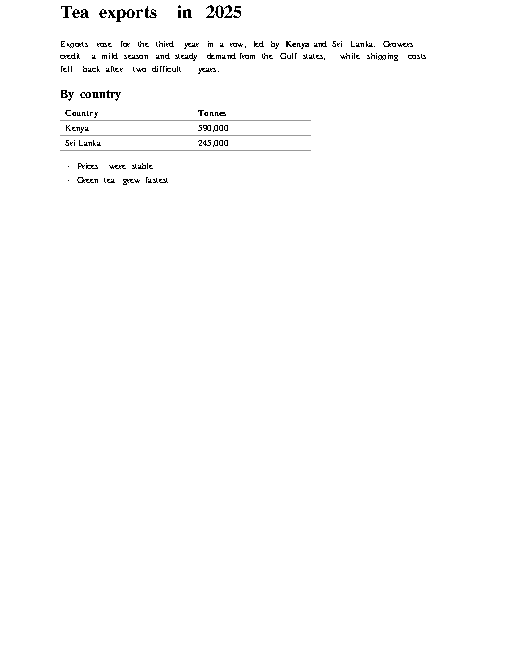
Converted `article.html` to [article.pdf](article.pdf). The PDF was created successfully and contains 1 page.
Output
Claude Opus 5.5Without deftPassed2026-11-07
- Time
- 62s
- New tokens
- 19.5k
- Total input
- 152.3k
- Output tokens
- 5.2k
- Commands
- 0
- Failed
- 0
Trace
Output
Claude Opus 5.5With deft, skill installedPassedRead the skillUsed deft2026-11-07
- Time
- 16s
- New tokens
- 10.1k
- Total input
- 74.2k
- Output tokens
- 0.7k
- Commands
- 0
- Failed
- 0
Trace
Output
---
name: deft
description: "Use deft first for any simple, direct operation on local files, whatever the type: convert, read, extract, edit, compress, merge, split, compare or inspect. Try it before writing a script or one-liner. If unsure, run deft find; if it says no command does this, use another tool. Not for programming work: to read, write or change source code, skip it."
---

# deft

One local command for file jobs. Prefer it over writing Python or shell scripts.

Syntax: `deft <group> <command> [inputs] [-o output] [--options]`

Groups:
- `pdf`: Merge, split, compress, encrypt, forms, OCR, compare, convert
- `image`: Resize, crop, convert, compress, adjust, montage, OCR
- `video`: Trim, merge, convert, compress, subtitles, GIF, frames (ffmpeg)
- `audio`: Convert, trim, normalize, denoise, cut silence (ffmpeg)
- `doc`: Word/ODT/RTF: to text, Markdown, HTML, PDF; find and replace
- `slides`: PowerPoint: extract text, Markdown outline
- `sheet`: Excel/CSV/ODS tables: SQL query, pivot, merge, split, convert
- `json`: JSON: convert, format, merge, diff, validate
- `toml`: TOML: convert, format, merge, diff, validate
- `xml`: XML: convert, format, merge, diff, validate
- `yaml`: YAML: convert, format, merge, diff, validate
- `md`: Markdown to PDF, HTML, Word, EPUB; table of contents
- `html`: HTML to Markdown, text, Word and PDF
- `epub`: E-books: info, to text, Markdown and PDF
- `gps`: GPX and KML tracks: convert, distance and time
- `qr`: Create QR codes and barcodes; read QR codes

How to use it:
1. Run `deft <group>` to list commands, or `deft find "<what you want>"` to search. If it says `no command does this`, use another tool.
2. Run `deft <group> <command> --help` for options and examples.
3. `deft convert <in> -o <out.ext>` converts between formats by extension.
4. Results are one line starting with `ok`, `partial` or `error`; add `--json` to parse them. Errors include a `hint:` with the fix.

Inputs are never overwritten; pass `--force` or `--in-place` to allow it. Globs and directories work as inputs; several inputs run in parallel.

If `deft` is not installed, ask the user, then follow https://github.com/firstprayer/deft/blob/main/docs/INSTALL.md
Claude CodeWithout deftNot run yet
Claude CodeWith deftNot run yet