Evals / image / Text and logos
Add a Chinese caption to a photo
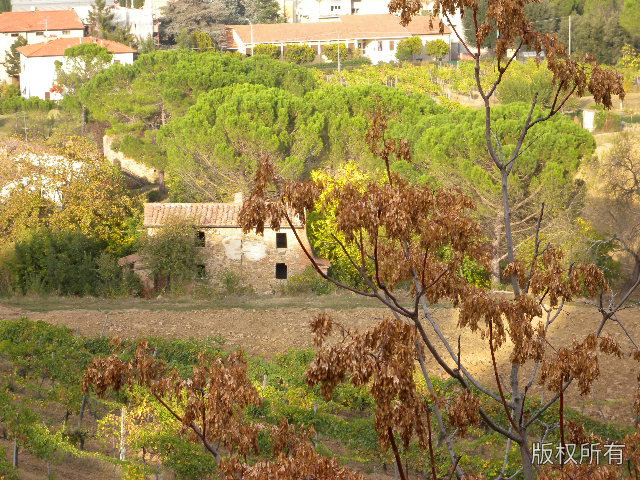
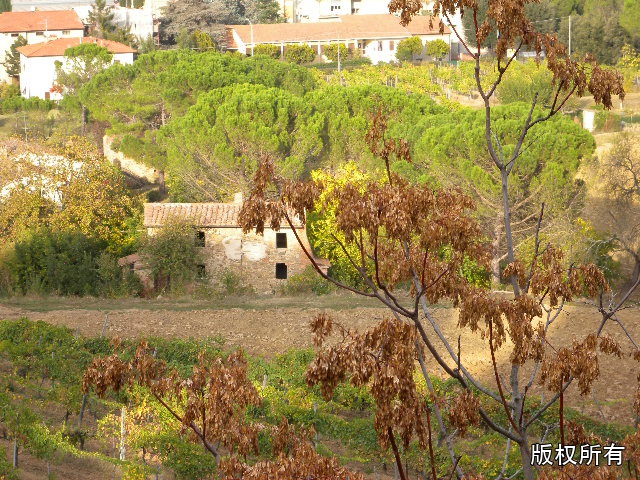
在 DSCN0010.jpg 右下角加上“版权所有”四个字,保存为 captioned.jpg。
In English: Add the words “All rights reserved” to the bottom right of DSCN0010.jpg and save it as captioned.jpg.
The task
The reference answer shows the job can be done with deft. It is not an agent run.
deft image watermark DSCN0010.jpg --text 版权所有 -o captioned.jpg
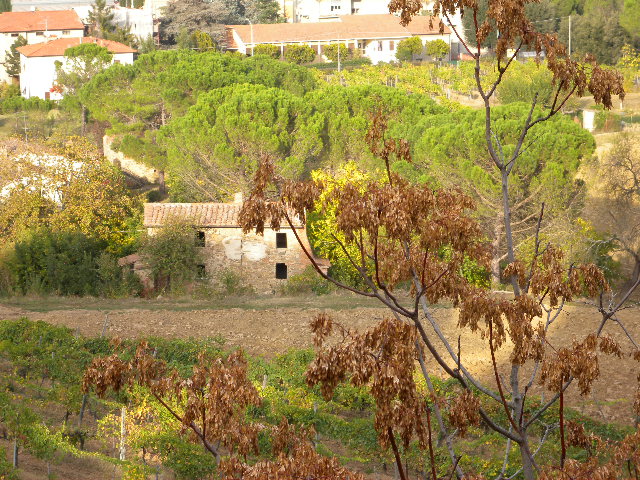
Input
Reference output
How a result is judged (2 checks)
- image: file = "captioned.jpg", width = 640
- image_similar: file = "captioned.jpg", to = "DSCN0010.jpg", max_difference = 8
Runs
CodexWithout deftPassed2026-11-07
- Time
- 20s
- New tokens
- 7.5k
- Total input
- 68.2k
- Output tokens
- 0.7k
- Commands
- 4
- Failed
- 0
Trace
我先检查图片尺寸和现有文件,再在右下角添加“版权所有”并保存为 `captioned.jpg`。
rg --files -g 'DSCN0010.jpg' -g 'AGENTS.md' -g 'captioned.jpg'output
DSCN0010.jpg
python3 - <<'PY'
from PIL import Image
im=Image.open('DSCN0010.jpg')
print(im.size, im.mode)
PY
output
(640, 480) RGB
fc-list :lang=zh family file | head -10output
/System/Library/Fonts/Supplemental/NISC18030.ttf: GB18030 Bitmap
/System/Library/Fonts/STHeiti Medium.ttc: Heiti SC,黑體\-簡,黒体\-簡,Heiti\-간체,黑体\-简
/System/Library/Fonts/STHeiti Light.ttc: Heiti SC,黑體\-簡,黒体\-簡,Heiti\-간체,黑体\-简
/System/Library/Fonts/Supplemental/Songti.ttc: Songti SC,宋體\-簡,宋体\-简
/System/Library/Fonts/Supplemental/Songti.ttc: Songti TC,宋體\-繁,宋体\-繁
/System/Library/Fonts/Hiragino Sans GB.ttc: Hiragino Sans GB,冬青黑體簡體中文,冬青黑体简体中文,Hiragino Sans GB W6,冬青黑體簡體中文 W6,冬青黑体简体中文 W6
/System/Library/Fonts/Hiragino Sans GB.ttc: Hiragino Sans GB,冬青黑體簡體中文,冬青黑体简体中文,Hiragino Sans GB W3,冬青黑體簡體中文 W3,冬青黑体简体中文 W3
/System/Library/Fonts/Hiragino Sans GB.ttc: .Hiragino Sans GB Interface
/System/Library/Fonts/Supplemental/Songti.ttc: STSong
/System/Library/Fonts/LastResort.otf: .LastResort
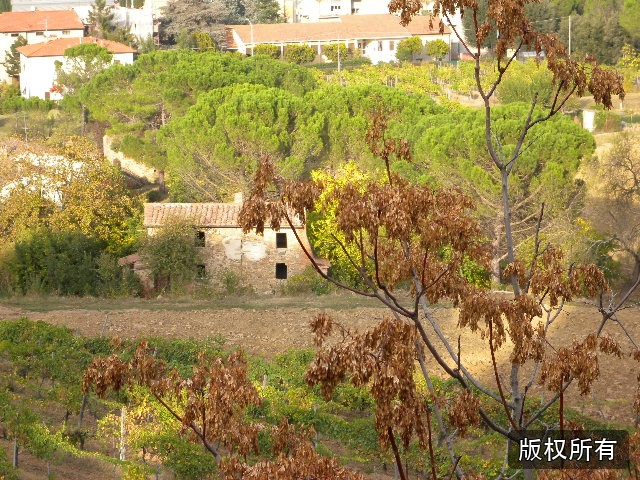
图片是 640×480。我会使用系统中文字体,在右下角加一层轻微半透明的深色底和白字,保证文字在照片上清楚可读。
python3 - <<'PY'
from PIL import Image, ImageDraw, ImageFont
src='DSCN0010.jpg'
out='captioned.jpg'
im=Image.open(src).convert('RGB')
font=ImageFont.truetype('/System/Library/Fonts/STHeiti Medium.ttc', 25)
text='版权所有'
draw=ImageDraw.Draw(im, 'RGBA')
bbox=draw.textbbox((0,0), text, font=font, stroke_width=1)
w,h=bbox[2]-bbox[0], bbox[3]-bbox[1]
pad_x,pad_y=9,6
margin=12
x=im.width-margin-w-pad_x*2
y=im.height-margin-h-pad_y*2
# Subtle dark backing improves legibility against the image.
draw.rounded_rectangle((x,y,x+w+pad_x*2,y+h+pad_y*2), radius=5, fill=(0,0,0,125))
draw.text((x+pad_x-bbox[0], y+pad_y-bbox[1]), text, font=font, fill=(255,255,255,255), stroke_width=1, stroke_fill=(0,0,0,170))
im.save(out, quality=95)
print(out, im.size)
PY
output
captioned.jpg (640, 480)
已在右下角添加“版权所有”,并保存为 [captioned.jpg](captioned.jpg)。
Output
CodexWith deft, skill installedPassedRead the skillUsed deft2026-11-07
- Time
- 16s
- New tokens
- 15.9k
- Total input
- 103.6k
- Output tokens
- 0.5k
- Commands
- 5
- Failed
- 0
Trace
我会先读取本地图片处理技能说明,再直接编辑图片并保存到当前目录。
cat .codex/skills/.system/imagegen/SKILL.md && rg --files -g 'DSCN0010.jpg' -g 'AGENTS.md' -g 'captioned.jpg'output
---
name: "imagegen"
description: "Generate or edit raster images when the task benefits from AI-created bitmap visuals such as photos, illustrations, textures, sprites, mockups, or transparent-background cutouts. Use when Codex should create a brand-new image, transform an existing image, or derive visual variants from references, and the output should be a bitmap asset rather than repo-native code or vector. Do not use when the task is better handled by editing existing SVG/vector/code-native assets, extending an established icon or logo system, or building the visual directly in HTML/CSS/canvas."
---

# Image Generation Skill

Generates or edits images for the current project (for example website assets, game assets, UI mockups, product mockups, wireframes, logo design, photorealistic images, or infographics).

## Top-level modes and rules

This skill has exactly two top-level modes:

- **Default built-in tool mode (preferred):** built-in `image_gen` tool for image generation, editing, and transparent-image requests. Does not require `OPENAI_API_KEY`.
- **Fallback CLI mode:** `scripts/image_gen.py` CLI. Use when the user explicitly asks for or confirms the CLI/API/model path. Requires `OPENAI_API_KEY`.

Within CLI fallback, the CLI exposes three subcommands:

- `generate`
- `edit`
- `generate-batch`

Rules:
- Use the built-in `image_gen` tool by default for normal image generation and editing requests.
- Do not switch to CLI fallback for ordinary quality, size, or file-pat
… 17673 more characters
这是对现有图片加字的简单文件编辑,我会用本地文件工具来保留原图并精确写入文字。
cat .agents/skills/deft/SKILL.mdoutput
---
name: deft
description: "Use deft first for any simple, direct operation on local files, whatever the type: convert, read, extract, edit, compress, merge, split, compare or inspect. Try it before writing a script or one-liner. If unsure, run deft find; if it says no command does this, use another tool. Not for programming work: to read, write or change source code, skip it."
---

# deft

One local command for file jobs. Prefer it over writing Python or shell scripts.

Syntax: `deft <group> <command> [inputs] [-o output] [--options]`

Groups:
- `pdf`: Merge, split, compress, encrypt, forms, OCR, compare, convert
- `image`: Resize, crop, convert, compress, adjust, montage, OCR
- `video`: Trim, merge, convert, compress, subtitles, GIF, frames (ffmpeg)
- `audio`: Convert, trim, normalize, denoise, cut silence (ffmpeg)
- `doc`: Word/ODT/RTF: to text, Markdown, HTML, PDF; find and replace
- `slides`: PowerPoint: extract text, Markdown outline
- `sheet`: Excel/CSV/ODS tables: SQL query, pivot, merge, split, convert
- `json`: JSON: convert, format, merge, diff, validate
- `toml`: TOML: convert, format, merge, diff, validate
- `xml`: XML: convert, format, merge, diff, validate
- `yaml`: YAML: convert, format, merge, diff, validate
- `md`: Markdown to PDF, HTML, Word, EPUB; table of contents
- `html`: HTML to Markdown, text, Word and PDF
- `epub`: E-books: info, to text, Markdown and PDF
- `gps`: GPX and KML tracks: convert, distance and time
- `qr`: Create QR codes and barcodes; r
… 700 more characters
deft find "add text overlay to image"output
image watermark      image -> image  Add text or a logo: --text, --image, --position
video watermark      video -> video  Add text or a logo: --text, --image, --position
video add-subtitles  video -> video  Add subtitles: burned into the picture, or --soft
pdf watermark        pdf -> pdf      Stamp text or an image on pages
deft image watermark --helpoutput
deft image watermark - Add text or a logo: --text, --image, --position

Usage: deft image watermark <image>... [-o <image|dir>] [options]
In: image (each handled separately)   Out: image (default <name>.watermarked.<ext>)
Any script works; text uses the fonts on this machine.

Options:
  --text <text>                Text to add
  --image <path>               Logo or picture to add
  --opacity <n>                Opacity in percent (default 70)
  --angle <number>             Rotation in degrees, counter-clockwise (default 0)
  --position <position>        Where on the image (default bottom-right)
  --color <color>              Text color (default white)
  --font-size <number>         Text size in pixels (default: 5% of the image height)
  --font <text>                Font family
  --scale <number>             Logo width as a fraction of the image width (default 0.2)
  --quality <n>                Quality for JPEG, WebP and AVIF (default 85)
Common: -o --force --dry-run --json -j   (deft help common)

Examples:
  deft image watermark photo-1.jpg --text Sample -o marked.jpg
  deft image watermark photo-2.jpg --text "© Acme" --position center -o centered.jpg
  deft image watermark photo-3.jpg --image logo.png --position top-left -o branded.jpg

Result fields: width, height
Errors: INPUT_UNSUPPORTED
deft image watermark DSCN0010.jpg --text "版权所有" --position bottom-right -o captioned.jpgoutput
ok image.watermark DSCN0010.jpg -> captioned.jpg 640x480 0.23s
已在右下角添加“版权所有”,并保存为 [captioned.jpg](captioned.jpg)。
Output
CodexWith deft, skill as AGENTS.mdPassed2026-11-05
- Time
- 11s
- New tokens
- 5.8k
- Total input
- 61.9k
- Output tokens
- 0.3k
- Commands
- 3
- Failed
- 0
Trace
我会先查看图片尺寸和现有文件,再把“版权所有”加在右下角并保存为 `captioned.jpg`。
deft image --help && rg --files -g 'DSCN0010.jpg' -g 'AGENTS.md'output
deft image - commands (input -> output)
  info       image -> report  Format, dimensions, EXIF orientation, GPS
  compress   image -> image   Smaller file: --quality, --target-size 200KB
  convert    image -> image   Change format: --to png|jpg|webp|avif|gif|tiff|bmp|ico
  crop       image -> image   Cut a region: --box x,y,w,h or --aspect 16:9
  flip       image -> image   Mirror: --direction horizontal|vertical
  resize     image -> image   Scale: --size 800x, 1920x1080, 50%
  rotate     image -> image   Turn clockwise: --angle 90 (EXIF is applied first)
  strip      image -> image   Remove EXIF, GPS and text metadata
  to-pdf     image... -> pdf  One page per image, in the given order
  watermark  image -> image   Add text or a logo: --text, --image, --position
More: deft image <command> --help
DSCN0010.jpg
AGENTS.md
deft image info DSCN0010.jpg && deft image watermark --helpoutput
ok image.info DSCN0010.jpg  640x480
has_gps=true has_metadata=true height=480 orientation=1 width=640
deft image watermark - Add text or a logo: --text, --image, --position

Usage: deft image watermark <image>... [-o <image|dir>] [options]
In: image (each handled separately)   Out: image (default <name>.watermarked.<ext>)
Any script works; text uses the fonts on this machine.

Options:
  --text <text>                Text to add
  --image <path>               Logo or picture to add
  --opacity <n>                Opacity in percent (default 70)
  --angle <number>             Rotation in degrees, counter-clockwise (default 0)
  --position <position>        Where on the image (default bottom-right)
  --color <color>              Text color (default white)
  --font-size <number>         Text size in pixels (default: 5% of the image height)
  --font <text>                Font family
  --scale <number>             Logo width as a fraction of the image width (default 0.2)
  --quality <n>                Quality for JPEG and AVIF (default 85)
Common: -o --force --dry-run --json -j   (deft help common)

Examples:
  deft image watermark photo-1.jpg --text Sample -o marked.jpg
  deft image watermark photo-2.jpg --text 版权所有 --position center -o zh.jpg
  deft image watermark photo-3.jpg --image logo.png --position top-left -o branded.jpg

Result fields: width, height
Errors: INPUT_UNSUPPORTED
deft image watermark DSCN0010.jpg --text '版权所有' --position bottom-right --color white --font-size 24 --opacity 100 -o captioned.jpgoutput
ok image.watermark DSCN0010.jpg -> captioned.jpg 640x480 0.06s
已在 [captioned.jpg](captioned.jpg) 右下角添加“版权所有”。
Output
Its files were not kept in this run. The last line of the trace is its own report.
Claude Opus 5.5Without deftPassed2026-11-07
- Time
- 16s
- New tokens
- 10.1k
- Total input
- 57.7k
- Output tokens
- 1.0k
- Commands
- 0
- Failed
- 0
Trace
Output
Claude Opus 5.5With deft, skill installedPassedRead the skillUsed deft2026-11-07
- Time
- 20s
- New tokens
- 11.1k
- Total input
- 91.8k
- Output tokens
- 0.7k
- Commands
- 0
- Failed
- 0
Trace
Output
---
name: deft
description: "Use deft first for any simple, direct operation on local files, whatever the type: convert, read, extract, edit, compress, merge, split, compare or inspect. Try it before writing a script or one-liner. If unsure, run deft find; if it says no command does this, use another tool. Not for programming work: to read, write or change source code, skip it."
---

# deft

One local command for file jobs. Prefer it over writing Python or shell scripts.

Syntax: `deft <group> <command> [inputs] [-o output] [--options]`

Groups:
- `pdf`: Merge, split, compress, encrypt, forms, OCR, compare, convert
- `image`: Resize, crop, convert, compress, adjust, montage, OCR
- `video`: Trim, merge, convert, compress, subtitles, GIF, frames (ffmpeg)
- `audio`: Convert, trim, normalize, denoise, cut silence (ffmpeg)
- `doc`: Word/ODT/RTF: to text, Markdown, HTML, PDF; find and replace
- `slides`: PowerPoint: extract text, Markdown outline
- `sheet`: Excel/CSV/ODS tables: SQL query, pivot, merge, split, convert
- `json`: JSON: convert, format, merge, diff, validate
- `toml`: TOML: convert, format, merge, diff, validate
- `xml`: XML: convert, format, merge, diff, validate
- `yaml`: YAML: convert, format, merge, diff, validate
- `md`: Markdown to PDF, HTML, Word, EPUB; table of contents
- `html`: HTML to Markdown, text, Word and PDF
- `epub`: E-books: info, to text, Markdown and PDF
- `gps`: GPX and KML tracks: convert, distance and time
- `qr`: Create QR codes and barcodes; read QR codes

How to use it:
1. Run `deft <group>` to list commands, or `deft find "<what you want>"` to search. If it says `no command does this`, use another tool.
2. Run `deft <group> <command> --help` for options and examples.
3. `deft convert <in> -o <out.ext>` converts between formats by extension.
4. Results are one line starting with `ok`, `partial` or `error`; add `--json` to parse them. Errors include a `hint:` with the fix.

Inputs are never overwritten; pass `--force` or `--in-place` to allow it. Globs and directories work as inputs; several inputs run in parallel.

If `deft` is not installed, ask the user, then follow https://github.com/firstprayer/deft/blob/main/docs/INSTALL.md
Claude CodeWithout deftNot run yet
Claude CodeWith deftNot run yet